
Goal-level records
Progress entries stay connected to the student, the applicable goal, and the originating IEP.
Fullmind educators document progress against the IEP goals they teach. Authorized school and district staff can review current goal-level records and export dated reports from the Fullmind platform.
Progress entries stay connected to the student, the applicable goal, and the originating IEP.
Each entry records the date, author, progress status, instructional note, and available work sample.
Authorized users can review current status and export a report for a selected date range.
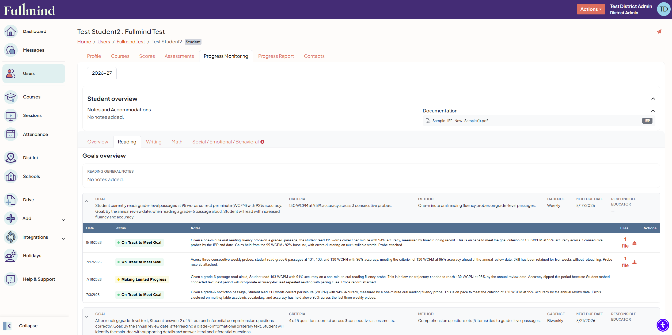
The Progress Monitoring area organizes goals by subject and service area. Each goal displays the expected monitoring cadence, most recent entry date, current status, and whether the record needs an update.
Administrators and authorized designees can move from the student overview to a subject-specific view when they need the complete history behind a goal.
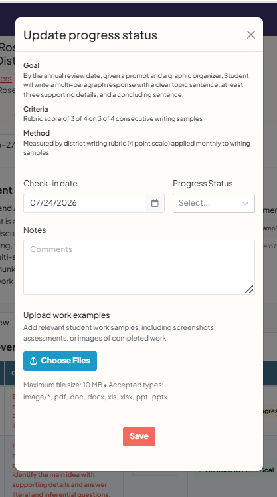
Fullmind educators enter progress directly against the goal they are teaching. The structured update includes the check-in date, progress status, a written note, and relevant work examples when available.
Status language is designed to show whether the available evidence indicates sufficient progress toward the annual goal. An insufficient-data status keeps the reporting record explicit when attendance, service timing, or another barrier limits the evidence available.
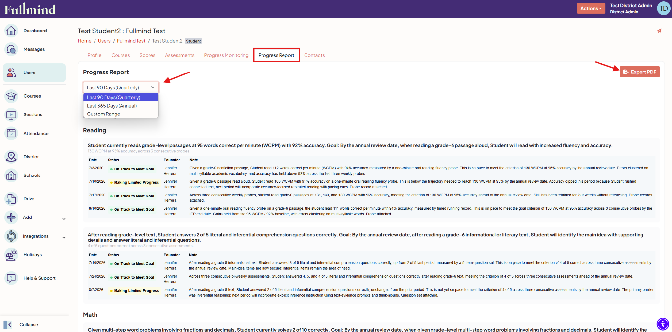
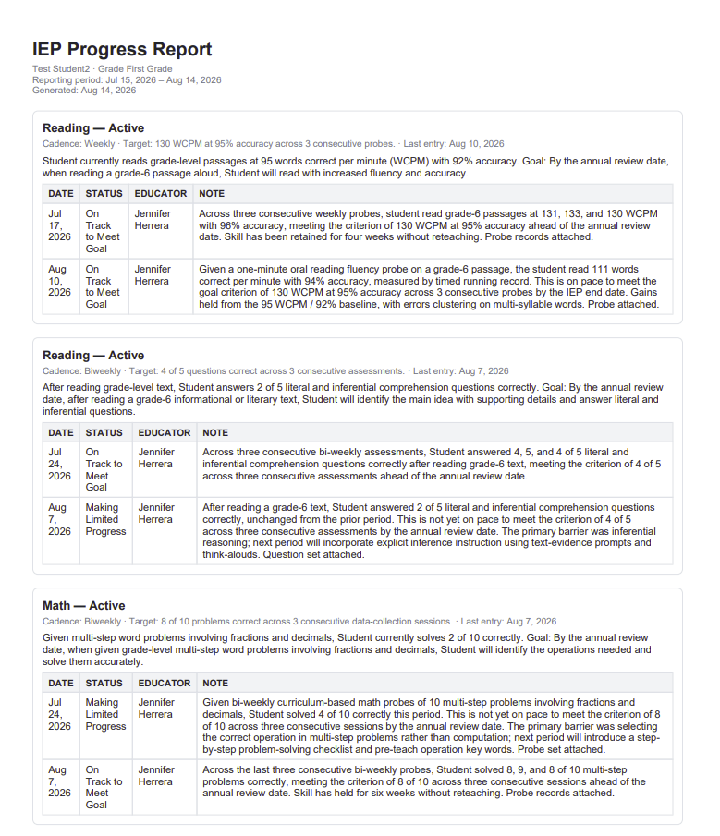
Authorized school users can select a date range and generate a student progress report. The report organizes available updates by subject, goal, date, status, author, and note so teams can review the evidence used during the selected period.
Reports remain complete when there is not enough evidence to assess a goal. The record identifies that status rather than leaving an unexplained gap.
Progress monitoring operates inside the Fullmind platform with controls designed for education records and minimum-necessary access.
IEP documents, downloads, goals, and progress records are available only to authorized users with a legitimate educational interest.
Superseded IEP documents retain version history. An IEP with associated progress data cannot be deleted from the record.
IEP access and document activity are recorded in an audit log available within the authorized workflow.
Fullmind maintains a SOC 2 Type 2 attestation and applies the security practices described on our Security Information page.
The school uploads the student’s current IEP to the Fullmind student profile. File validation, an in-browser viewer, role-gated download, and document history support the intake process.
Goals are organized in the student record with the monitoring cadence established for the service.
The Fullmind educator records dated progress against each applicable goal using structured status language and instructional notes.
Authorized administrators and designees can review current goal status and export the available records for a selected date range.
Progress monitoring is a capability within Fullmind’s virtual special education instruction and staffing services. Schools do not purchase a separate software product or add a separate platform for this workflow. Your Fullmind Customer Success Manager or Account Representative can confirm the services and student records where it applies.
Fullmind educators providing the applicable instruction enter progress updates against the goals they teach.
Authorized school and district staff, including designated administrators and case-management personnel, can review records according to their assigned access.
Yes. Authorized users can select a date range and generate a PDF report containing the available goal-level entries for that period.
The goal view compares the expected monitoring cadence with the most recent progress entry and marks a goal when an update is due.
The educator can record an insufficient-data status and explain the available evidence. The report remains explicit instead of presenting a blank period.
Fullmind’s student-data commitments, security safeguards, retention practices, and contact information are available on the Security Information page.
Every child deserves the opportunity to access exceptional education.